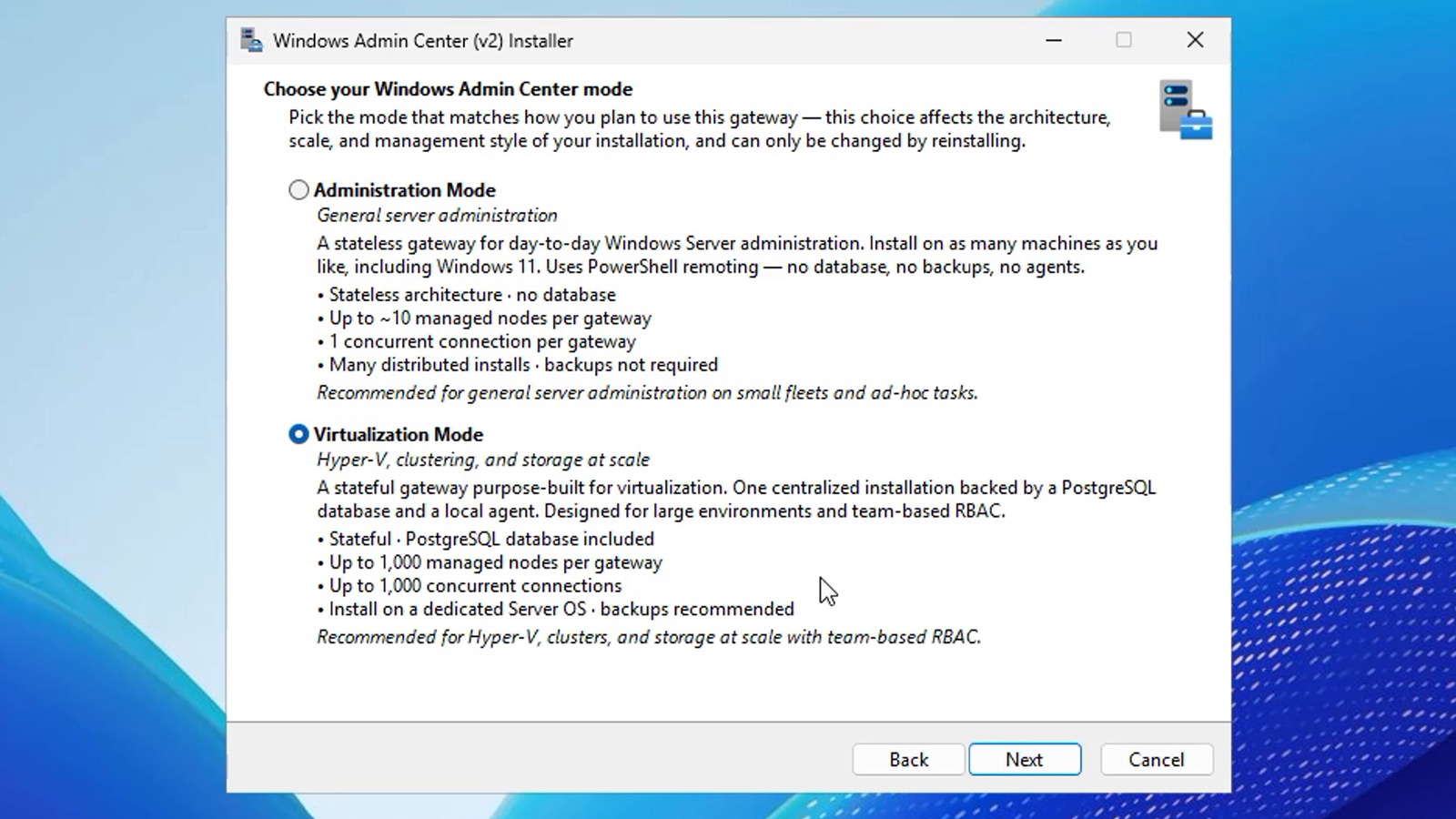
Microsoft has released Windows Admin Center 2610 as a public preview, and this release is worth a closer look for Windows Server administrators. The biggest platform change is a single installer for Administration Mode and Virtualization Mode. You still choose one mode for each installation, but the setup experience is now unified.
The preview also expands Virtualization Mode with Azure Arc onboarding, backup and restore, certificate lifecycle management, networking improvements, live migration support, and other operational changes. Microsoft published the preview on September 18, 2026 and added an important known issue update on September 23.
One installer for both management modes
Windows Admin Center now uses one installer for Administration Mode and Virtualization Mode. Microsoft says this should make deployment and evaluation simpler, especially for teams that are testing Virtualization Mode for Hyper-V and hybrid infrastructure management.
The two modes are still separate choices. Microsoft does not support installing both modes on the same machine at the same time.
Azure registration is simpler, but there is a current issue
The gateway Azure registration flow has been redesigned. Microsoft says the new flow asks only for the permissions needed by the current user and registration task. It also removes the need for tenant level administrator consent during the registration process. Administrators can still control Azure operations through Azure role based access control.
There is one important warning. Microsoft updated the announcement on September 23 and said the new Azure registration experience may not work correctly in this preview build. A fix is planned for an updated preview.
Virtualization Mode gets more useful for real admin work
Virtualization Mode receives several changes that make it more practical for administrators who manage Hyper-V and hybrid environments.
Azure Arc onboarding is built into the experience for connecting infrastructure to Azure services.
Backup and restore capabilities are part of the new preview improvements.
Certificate lifecycle management can use Active Directory Certificate Services for production oriented certificate governance and renewal.
Networking workflows now expose more network intent information and additional diagnostics.
Live migration is aware of machines managed through Virtualization Mode, making VM movement easier to manage from Windows Admin Center.
GPU tooling and agent health visibility have also been improved.
Microsoft has paused the preview VM Conversion tool
There is also a change administrators should know about if they were testing VMware migration through Windows Admin Center. Microsoft says a Broadcom change affected availability of the VMware Virtual Disk Development Kit package required by the preview VM Conversion extension.
Microsoft has removed that extension from the feed for now and recommends that customers stop evaluating the preview VM Conversion tool until another update is available. For migrations, Microsoft points administrators to System Center Virtual Machine Manager for Windows Server with Hyper-V, or Azure Migrate for Azure based migrations.
The SDK now supports React based extensions
Windows Admin Center SDK 6.0.0 is also part of this release. It includes commands for upgrading existing extensions to Angular 20 and for creating and testing React based Windows Admin Center extensions. This matters mainly to teams that build internal or third party management extensions.
Known issues to keep in mind
This is still a preview release, so it should be treated as test software rather than an automatic production upgrade. Microsoft lists several known issues in the current build.
The Azure Arc enabled status table may look inaccurate when it is collapsed.
Some links inside tool extensions may send users to an Administration Mode interface.
VM live migration can fail when the source and target nodes use different authentication methods.
The new Azure registration experience may not work correctly in the current build.
What this means for Windows Server admins
For administrators already using Windows Admin Center, the combined installer is the most visible platform change. For teams evaluating Virtualization Mode, the bigger story is that Microsoft is steadily turning it into a broader Hyper-V and hybrid management experience with Azure Arc, networking, certificate management, and live migration becoming more integrated.
There is no reason to rush this preview into a critical production environment. A lab or non critical environment is the better place to test it today, especially because Microsoft has already documented issues with Azure registration and some migration scenarios.
If your team manages Windows Server, Hyper-V, or Azure connected infrastructure, this preview is still worth testing. It gives a good indication of where Microsoft is taking Windows Admin Center before the next general availability release.
Official source
Microsoft published the full announcement and current known issues on the Windows Admin Center Blog.